If you chose shipping when you registered, the auction house ships your lots after you pay. You can follow each step from your invoice.
Follow your order
- Open My Purchases in your account and select the paid invoice.
- Shipping Progress shows where your order is: Paid, Processing, Shipped, Delivered.
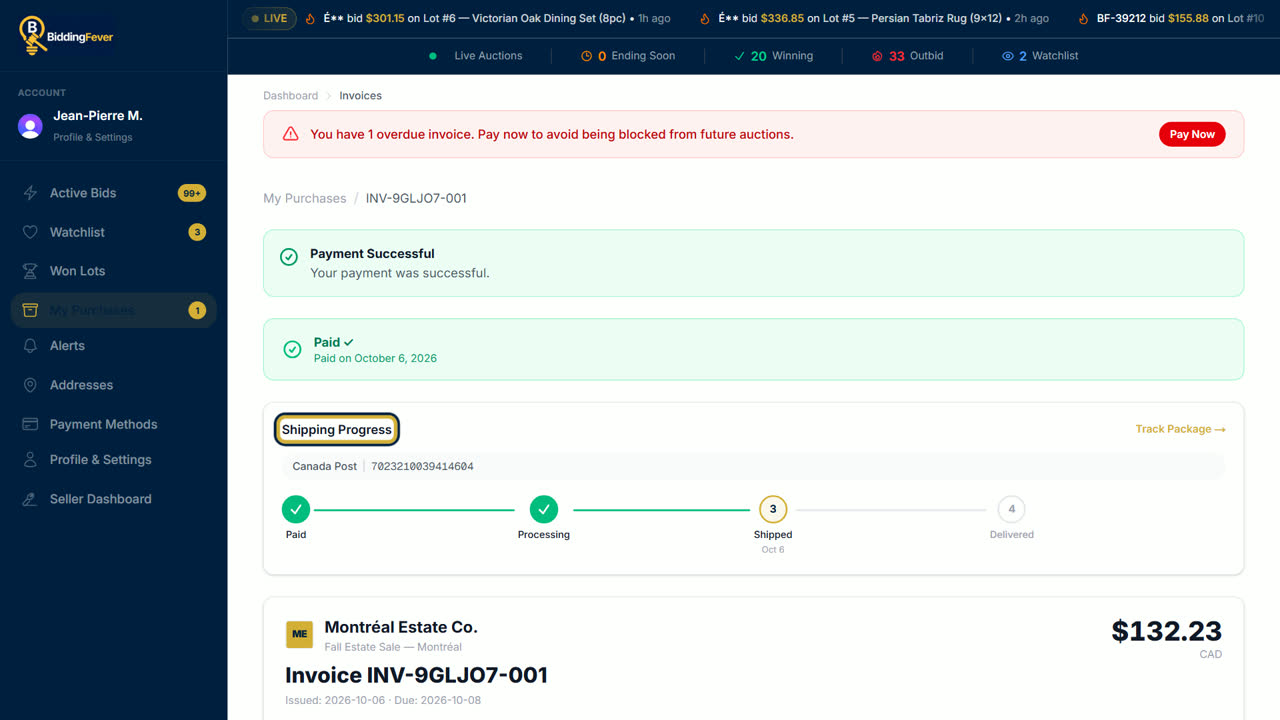
- Once it ships, the invoice shows the carrier and the tracking number. Select Track Package to follow it on the carrier's site.
- You also get an email when your item ships, with the tracking link.
Tracking updates
- When the auction house's shipping partner sends updates to Bidding Fever, Shipment tracking on the invoice you open with View Invoice from the lot page shows the latest status and the Tracking history: label created, in transit, out for delivery, delivered.
- If there are no updates yet, it says No carrier updates yet. The carrier's own site may still have news.
Pickup instead
If you chose pickup, the invoice shows Pickup Progress. Go at the time and place the auction house gives you. The step changes to Picked Up once you have your items.
If something goes wrong
If a delivery attempt fails or the parcel goes back to the sender, you are told. Contact the auction house first. If you cannot settle it together, see Disputes.
Updated October 8, 2026